
Social Tools
Free YouTube to MP4 Converter
Free YouTube to MP4 converter Online — Convert YouTube to MP4 and Download MP4 video in Seconds. Fast Download & No Watermark.
Related
Other Social Tools
Overview
What is a YouTube to MP4 Converter?
A YouTube to MP4 Converter is an online tool that converts YouTube videos into downloadable MP4 files you can save on your device. FrontendGeek's YouTube to MP4 converter runs in your browser: paste a link, load the video, play it with the built-in player, and download the MP4 after a free sign-in. No software installation and no watermark. Whether you need to convert YouTube to MP4 for offline viewing, personal archives you own, or quick previews before saving, this tool keeps the workflow simple.
How to use
How to Use This YouTube to MP4 Converter?
- 1
Paste the YouTube URL
Copy the video link from YouTube and paste it into the input box. Watch links, Shorts links, and youtu.be URLs are all supported.
- 2
Load the video
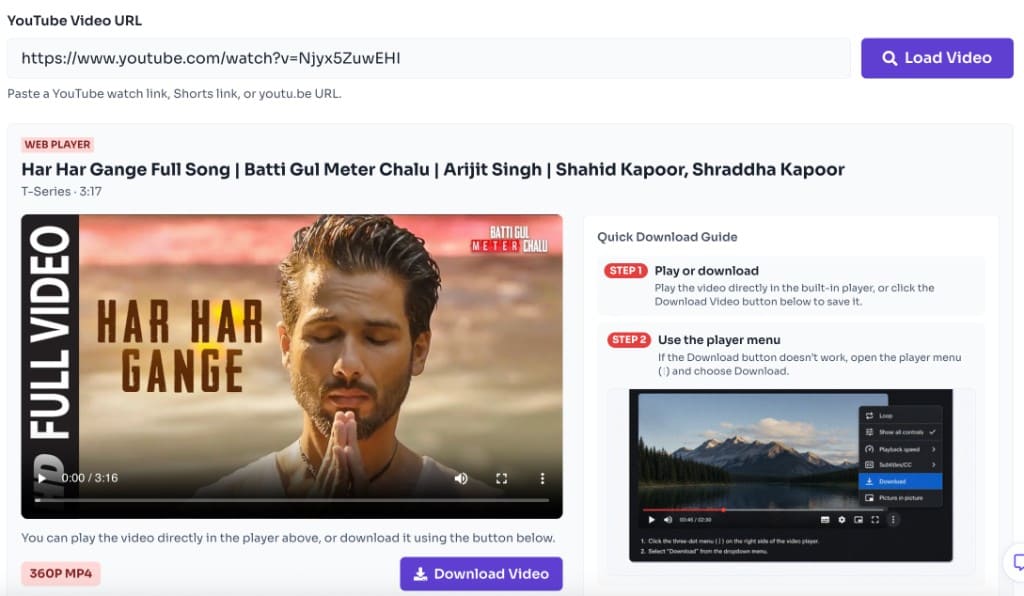
Click Load Video to fetch the title, channel, duration, thumbnail, and prepare the player. This step tells the YouTube to MP4 converter which stream to convert.

- 3
Play in your browser
Use the built-in web player to preview the video before converting. The tool automatically selects the best playable MP4-compatible quality.
- 4
Download the MP4
Click Download MP4, sign in for free if prompted, confirm the terms prompt, and save the file. You can also use the player menu (⋮) shown in the Quick Download Guide if needed.
Why use it
Why use this YouTube to MP4 converter online?
- Convert YouTube to MP4 without desktop apps or browser extensions
- Play videos in the browser first, then download MP4 with one click
- Works on desktop and mobile with a paste-and-load workflow
- Free to use — sign in once to unlock downloads
- Ideal when you need a fast way to save YouTube videos as MP4 files you have rights to use
Features
Top Features of Our YouTube to MP4 Converter
Free Sign-in Downloads
Preview videos for free, then sign in once to unlock MP4 downloads.
Built-in Web Player
Preview before you convert. Play the video in your browser, then download MP4 with one click.
Fast Online Conversion
Load video details in seconds without installing desktop software.
Free to Use
Use the YouTube to MP4 converter for free with no watermark on downloaded files.
Supported devices to use Youtube MP4 Downloader
Convert and save MP4s wherever you browse. The YouTube to MP4 flow works across phones and computers so you can move a file into CapCut, iMovie, VLC, or your gallery without a special desktop client.
- Desktop browsers on Windows, macOS, and Linux
- Android phones and tablets with Chrome or Firefox
- iPhone and iPad via Safari or Chrome (save via Downloads / Files)
- Chromebooks and other devices that support browser file downloads
- No codec pack or paid converter app required to open standard MP4 output
Supported MP4 Formats and Quality at FrontendGeek?
Our YouTube to MP4 converter targets the MP4 container — the format phones, editors, and browsers understand by default. Example file sizes below are approximate for a typical mid-length video — your actual download size scales with length, bitrate, and the qualities YouTube exposes for that clip.
| Format | File Size | Quality |
|---|---|---|
| MP4 | 137.71 MB | 1080p |
| MP4 | 43.73 MB | 720p |
| MP4 | 27.97 MB | 480p |
| MP4 | 18.17 MB | 360p |
| MP4 | 11.8 MB | 240p |
| MP4 | 8.67 MB | 144p |
Troubleshooting & Tips Guide
Stuck converting YouTube to MP4? Double-check the link format, wait for Load Video to finish, then pick a quality that includes audio when you need sound. Private, age-gated, or geo-restricted clips often fail by design.
Use a valid YouTube URL
Paste a full watch URL, Shorts link, or youtu.be link — not a channel page or search results URL. Invalid links prevent the converter from fetching an MP4 stream.
Download button not working
If Download MP4 does nothing, wait for the preview to finish loading, then try the player menu path shown in the Quick Download Guide on this page.
High quality fails to start
Lower the selected quality if a high-resolution option fails to start. Browser-friendly MP4 options with audio may differ from separate video-only tracks on YouTube.
Stuck player or blank preview
Clear a stuck tab with a hard refresh, then click Load Video once more before retrying. Peak traffic can slow stream preparation.
Sign-in required for download
Sign in when prompted — MP4 downloads stay locked until the free account step and terms prompt complete. Preview still works before you sign in.
Large file downloads
Use stable Wi‑Fi for large 1080p MP4 saves and keep the browser tab open until the download finishes writing to your device.
Safety & Legal Guidance
Convert YouTube to MP4 only when you own the video, have a license, or otherwise have permission to store a local copy. Do not use this converter to pirate movies, music videos, or other protected works. Follow copyright law, YouTube Terms of Service, and local regulations. FrontendGeek provides a technical conversion helper — responsibility for lawful use stays with you.
Choose FrontendGeek for YT to MP4 Downloader Over Other?
If you searched specifically to convert YouTube to MP4, this page is tuned for that job: clear Load → preview → Download MP4 steps, free sign-in only when saving, and no watermark on the file. Compared with cluttered third-party mirrors, FrontendGeek keeps conversion-focused copy, quality selection guidance, and links to companion tools (audio extract and general video download) when MP4 alone is not enough.
- Conversion-first wording and UI for "YouTube to MP4" searches
- In-browser preview before you commit to an MP4 download
- Watermark-free files for content you are allowed to keep
- Fast path without installing shady desktop converters
- Consistent FrontendGeek experience across social media tools
FAQ
Frequently asked questions
Quick answers about YouTube to MP4 Converter.
Yes. FrontendGeek's YouTube to MP4 converter is free. You can preview videos without an account; a free sign-in is required to download.
Explore
More tools you may like
Newsletter
Stay Updated
Subscribe to FrontendGeek Hub for frontend interview preparation, interview experiences, curated resources and roadmaps.