
Coding Tools
JWT Token Decode Encode Online Free
A Free Online Tool for Instant JWT Token Decode/Encode. Easily decode JWT tokens to inspect the header, payload, JWT signatures, and encode JWT tokens using HS256, HS384, or HS512 algorithms.
Related
Other Coding Tools
Overview
What is a JWT Token?
A JSON Web Token (JWT) is a compact, URL-safe string used to securely transmit claims between parties. JWTs are commonly used for authentication and authorization in web APIs, single sign-on (SSO), and microservices.
How to use
How to Decode JWT Token Using This Tool?
- 1
Open the Decode Tab and Input JWT Token
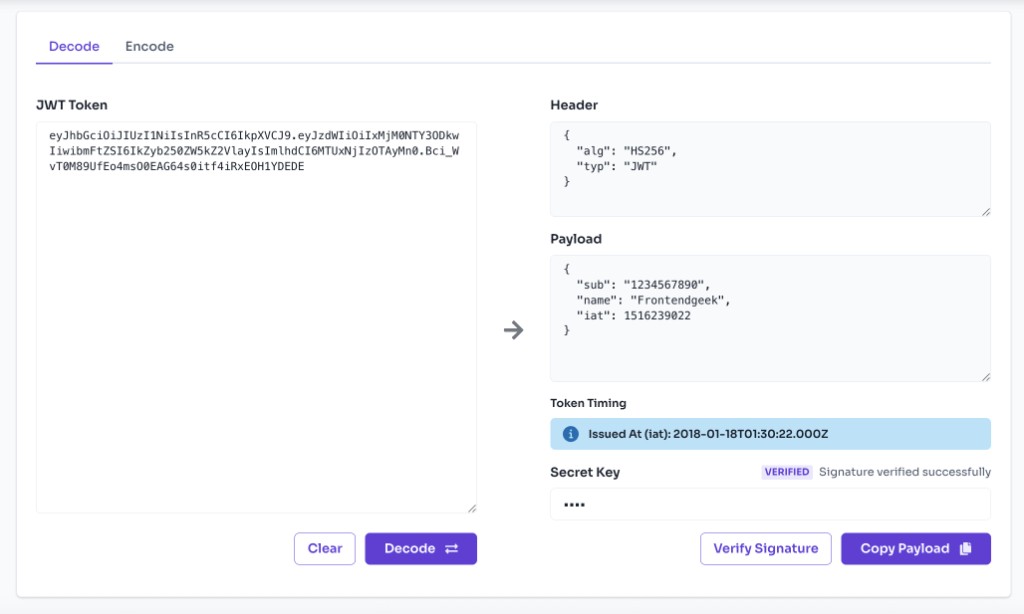
Switch to Decode and paste your JWT token into the input field. The tool loads with a sample token so you can see how it works.
- 2
Inspect Header and Payload
The decoded header shows the algorithm (alg) and token type (typ). The payload shows claims like sub, name, exp, and any custom fields as formatted JSON.
- 3
Verify the Signature (Optional)
Enter your HMAC secret key in the verification field and click Verify Signature to check whether the token was signed with HS256, HS384, or HS512.
- 4
Review Expiration Claims
If the token includes exp, nbf, or iat claims, the tool displays human-readable dates and whether the token is expired or not yet valid.
- 5
Encode a New JWT
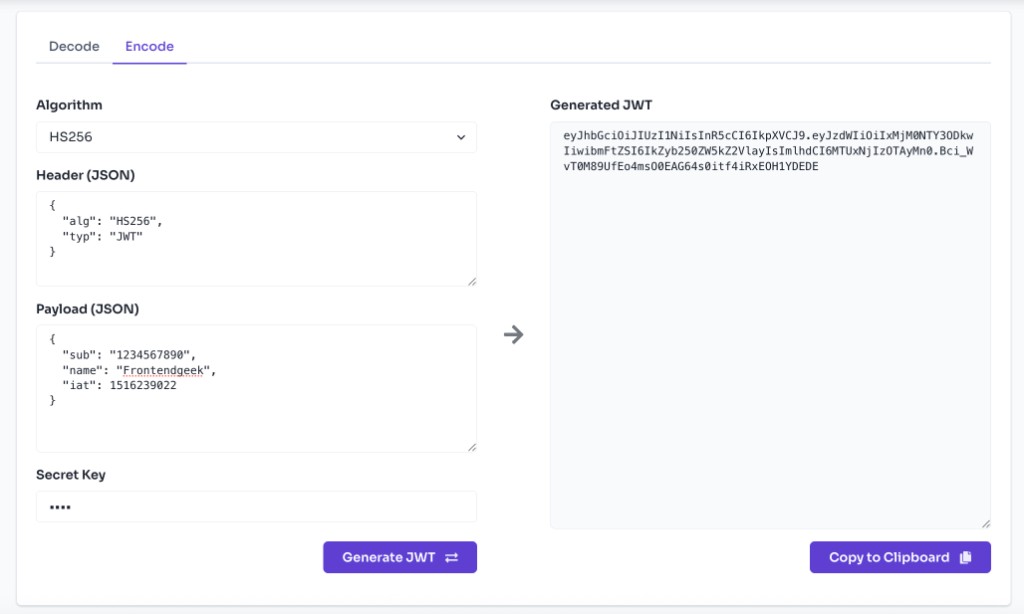
Switch to the Encode tab, edit the header and payload JSON, choose an algorithm, enter a secret, and click Generate JWT to create a signed token.
Features
Benefits
Self-contained: header, payload, and signature in one string
Self-contained: header, payload, and signature in one string
Stateless authentication for REST APIs and SPAs
Stateless authentication for REST APIs and SPAs
Standard format (RFC 7519) supported by most languages and frameworks
Standard format (RFC 7519) supported by most languages and frameworks
Signed tokens help detect tampering with header or payload
Signed tokens help detect tampering with header or payload
Easy to inspect claims like user ID, roles, and expiration
Easy to inspect claims like user ID, roles, and expiration
FAQ
Frequently asked questions
Quick answers about JWT Token Decode / Encode.
A JWT (JSON Web Token) is a signed or unsigned string with three parts: header, payload, and signature. The header describes the signing algorithm; the payload holds claims (data about the user or session); the signature ensures the token has not been altered.
Explore
More tools you may like
Newsletter
Stay Updated
Subscribe to FrontendGeek Hub for frontend interview preparation, interview experiences, curated resources and roadmaps.